
Note
You can download this example as a Jupyter notebook or start it in interactive mode.
Use Coordinates#
Now, the real power of the package comes into play!
Linopy is structured around the concept that variables, and therefore expressions and constraints, have coordinates. That is, a Variable object actually contains multiple variables across dimensions, just as we know it from a numpy array or a pandas.DataFrame.
Suppose the two variables x and y are now functions of time t and we would modify the problem according to:
Minimize:
subject to:
whereas t spans all the range from 0 to 10.
In order to formulate the new problem with linopy, we start again by initializing a model.
[1]:
import linopy

m = linopy.Model()
Again, we define x and y using the add_variables function, but now we are adding a coords argument. This automatically creates optimization variables for all coordinates, in this case time-steps.
[2]:
import pandas as pd

time = pd.Index(range(10), name="time")

x = m.add_variables(
    lower=0,
    coords=[time],
    name="x",
)
y = m.add_variables(lower=0, coords=[time], name="y")
Following the previous example, we write the constraints out using the syntax from above, while multiplying the rhs with t. Note that the coordinates from the lhs and the rhs have to match.
Note
In the beginning, it is recommended to use explicit dimension names. Like that, things remain clear and no unexpected broadcasting (which we show later) will happen.
[3]:
factor = pd.Series(time, index=time)

3 * x + 7 * y >= 10 * factor
[3]:
Constraint (unassigned) [time: 10]:
-----------------------------------
[0]: +3 x[0] + 7 y[0] ≥ -0.0
[1]: +3 x[1] + 7 y[1] ≥ 10.0
[2]: +3 x[2] + 7 y[2] ≥ 20.0
[3]: +3 x[3] + 7 y[3] ≥ 30.0
[4]: +3 x[4] + 7 y[4] ≥ 40.0
[5]: +3 x[5] + 7 y[5] ≥ 50.0
[6]: +3 x[6] + 7 y[6] ≥ 60.0
[7]: +3 x[7] + 7 y[7] ≥ 70.0
[8]: +3 x[8] + 7 y[8] ≥ 80.0
[9]: +3 x[9] + 7 y[9] ≥ 90.0
It always helps to write out the constraints before adding them to the model. Since they look good, let’s assign them.
[4]:
con1 = m.add_constraints(3 * x + 7 * y >= 10 * factor, name="con1")
con2 = m.add_constraints(5 * x + 2 * y >= 3 * factor, name="con2")
m
[4]:
Linopy LP model
===============

Variables:
----------
 * x (time)
 * y (time)

Constraints:
------------
 * con1 (time)
 * con2 (time)

Status:
-------
initialized
Now, when it comes to the objective, we use the sum function of linopy.LinearExpression. This stacks all terms all terms of the time dimension and writes them into one big expression.
[5]:
obj = (x + 2 * y).sum()
m.add_objective(obj)
[6]:
m.solve(solver_name="highs")
Running HiGHS 1.14.0 (git hash: 7df0786): Copyright (c) 2026 under MIT licence terms
LP linopy-problem-66av534w has 20 rows; 20 cols; 40 nonzeros
Coefficient ranges:
  Matrix  [2e+00, 7e+00]
  Cost    [1e+00, 2e+00]
  Bound   [0e+00, 0e+00]
  RHS     [3e+00, 9e+01]
Presolving model
18 rows, 18 cols, 36 nonzeros 0s
18 rows, 18 cols, 36 nonzeros 0s
Presolve reductions: rows 18(-2); columns 18(-2); nonzeros 36(-4)
Solving the presolved LP
Using dual simplex solver
  Iteration        Objective     Infeasibilities num(sum)
          0     0.0000000000e+00 Pr: 18(585) 0.0s
         18     1.2879310345e+02 Pr: 0(0) 0.0s

Performed postsolve
Solving the original LP from the solution after postsolve

Model name          : linopy-problem-66av534w
Model status        : Optimal
Simplex   iterations: 18
Objective value     :  1.2879310345e+02
P-D objective error :  0.0000000000e+00
HiGHS run time      :          0.00
[6]:
('ok', 'optimal')
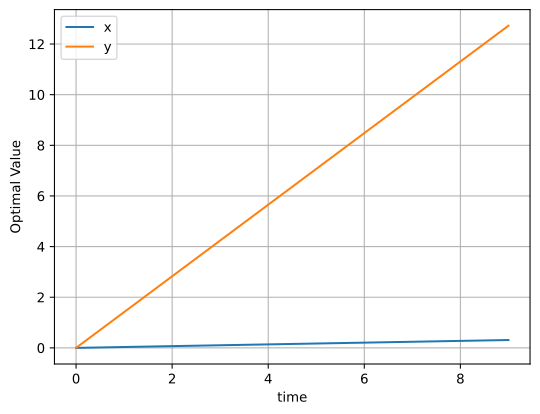
In order to inspect the solution. You can go via the variables, i.e. y.solution or via the solution aggregator of the model, which combines the solution of all variables. This can sometimes be helpful.
[7]:
m.solution.to_dataframe().plot(grid=True, ylabel="Optimal Value");
Alright! Now you learned how to set up linopy variables and expressions with coordinates. In the User Guide, which follows, we are going to see, how the representation of variables with coordinates allows us to formulate more advanced operations.